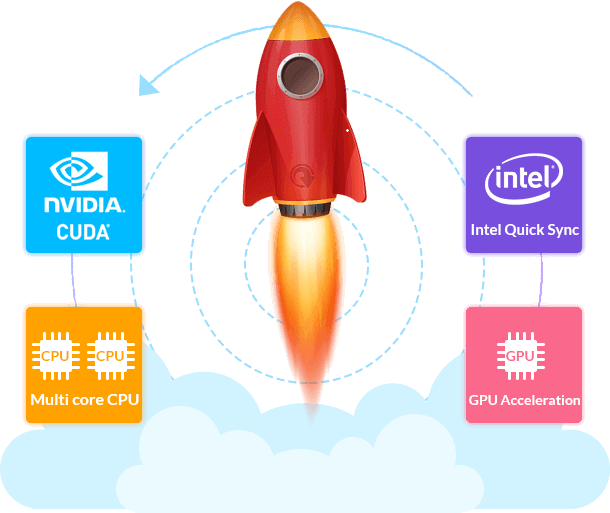
Hardware acceleration refers to a kind of efficiency promotion technology in computing field, substantially on the basis of hardware, especially GPUs (Graphics Processing Units), through execution of a set of special algorithms. More specifically, it focuses on transcoding and processing videos, DVDs & Blu-rays using encoder/decoder in GPU.
 |
|

EaseFab Optimized Products
 |
 |
 |
 |
||||
Convert & compress any 4K/HD videos. |
Copy and rip any DVD fast. |
Rip & backup all Blu-rays & DVDs. |
An all-in-one video, DVD and Blu-ray solution. |
||||
  |
|
|
|
||||
FAQs about Hardware Acceleration
How Does EaseFab Software Make Use of Hardware Acceleration?
How does hardware acceleration facilitate video encoding/decoding and DVD/Blu-ray ripping process? An easy way to understand the implementation of hardware acceleration is to go through the whole decoding encoding process. Here we take ripping a Blu-ray with EaseFab Blu-ray Ripper for an example:
- Firstly, EaseFab Blu-ray Ripper extracts video audio data block from source Blu-ray and decrypts it into original M2TS bit stream packet.
- Then it will be passed to hardware for decoding into raw data. (HWDec)
- Next, based on users' requirements of the output image, different hardware accelerators are executed to process the raw data. (Processing)
- After the processing, the data will be sent back to the hardware for encoding. (HWEnc)
- The final step: software packages the encoded video audio data into a standard multimedia file format.
We tested EaseFab Blu-ray Ripper on Windows 11 with an NVIDIA GeForce RTX 4060 (8GB) and an AMD Ryzen 9 7845HX with Radeon Graphics (3.00 GHz). Ripping the 33.4 GB Blu-ray movie "2012" to the MP4 (H.264/AAC) profile averaged 12 minutes across four runs, while the 6.84 GB “AVATAR” DVD took about 5 minutes. Using the MKV lossless profile, the job finished within 3 minutes, with the output matching the original source.
How to Use EaseFab Software GPU Acceleration?
Unlocking the full power of your GPU with EaseFab software is effortless. The software automatically checks your GPU/CPU information of NVIDIA/AMD GPU/Intel, and fully utilizes Hardware Acceleration for video/DVD/Blu-ray encoding and decoding. There is no need to worry about settings - hardware acceleration is seamlessly managed for you.
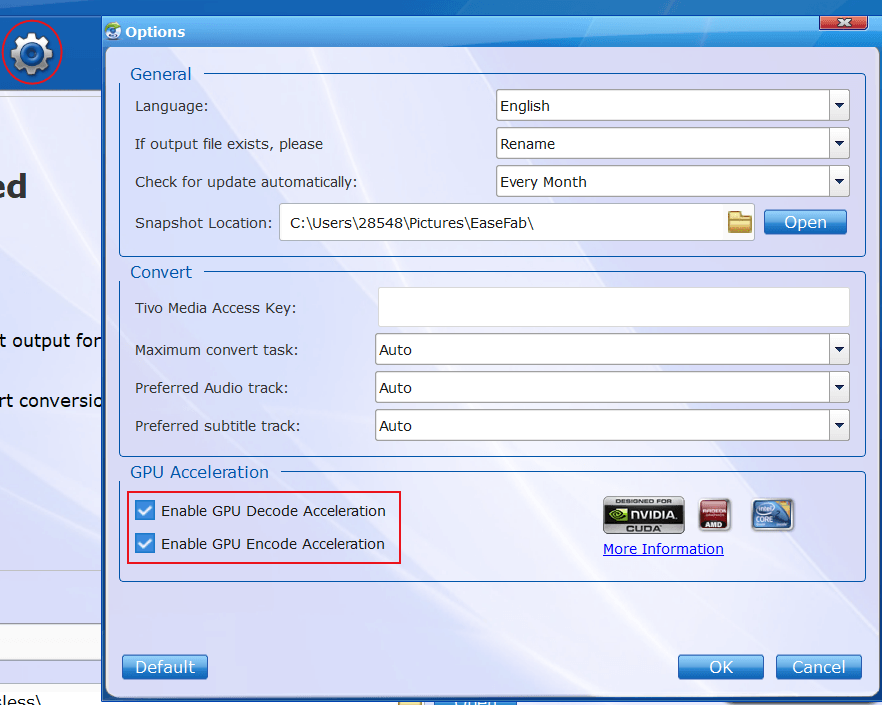
Tap Options button on navigation bar to open Options window, and then tick off Enable GPU Decode Acceleration and Enable GPU Encode Acceleration.
What's the Minimum Requirement to use Hardware Acceleration in EaseFab Software?
If your computer has a proper hardware, EaseFab software can invoke it for hardware acceleration. The requirement for GPU acceleration is low:
- OS: Windows 7 or later; macOS 10.13 or later
- Intel CPU: 2nd-generaton Intel Core (2011 Sandy Bridge) or newer (The 2015 6th-gen Intel Core Skylake is the minimum requirement for HEVC encoding/decoding).
- NVIDIA GPU: Kepler-based GPU (2012 GeForce GT 630) or newer (hardware accelerated HEVC transcoding raises the threshold to Nvidia Maxwel GM206 GPUs GTX 960/950) , up to latest NVIDIA RTX 50 series (5070, 5080, 5090)
- AMD: Radeon HD 7700 series (HD 7790 or newer)
Note: If you are computer illiterate and unknown of your computer CPU and GPU, just check the sticker normally marked with Intel and NVIDIA on your computer, which will indicate the exact Intel processor or graphics card in your computer.
Why doesn't GPU Acceleration Work for My Software?
If you have the NVIDIA® CUDA™, AMD® or Intel® Core™ graphics in your computer and you can't activate the GPU acceleration, it will generally be due to the reasons below:
- The video card you are using is not supported by GPU acceleration.
- You may have an out of date graphics card driver. Before updating the GPU driver, you need to check the specific product of your graphics.
1. Open "Control Panel" > "Hardware and Sound" > "Device Manager".
2. Expand the option under "Display adapters". Double-click on it to open the properties tab.
3. Click the "Driver" option to check more details.
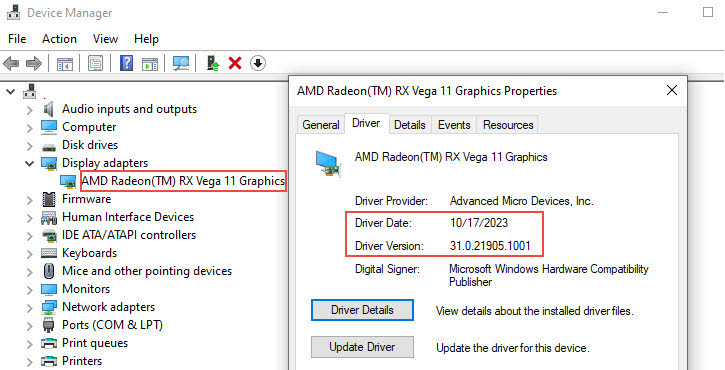
If your computer is running on 64-bit OS and the GPU driver is newer than the version of September 2020, you can update the driver for full use of the latest EaseFab software in the following parts. - The graphic card may be damaged, and not accepting the incoming information. Verify that the card is working properly, and if it’s not, it may be time to upgrade the card.
How to Update GPU Drivers on Windows
An up-to-date graphics driver can fully utilize the power of GPUs for video/DVD/Blu-ray processing in EaseFab software. If your computer is 64-bit and the GPU driver date is newer than September 2020, you can follow the steps below to update your NVIDIA, AMD or Intel driver and achieve full use of hardware acceleration in EaseFab software. .
 Download and Install the Latest NVIDIA Driver
Step 1. Go to the download page of NVIDIA driver: https://www.nvidia.com/en-us/drivers/. Select an appropriate driver according to the type, series, specific product name, and the OS. Then click "Search".
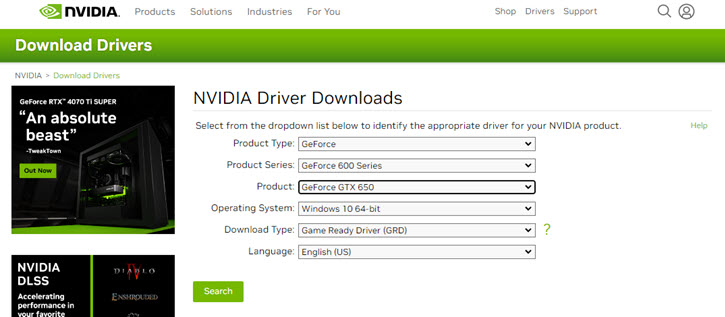
Step 2. Click "Download". When it prompts again, click the "Download" button once more to confirm.
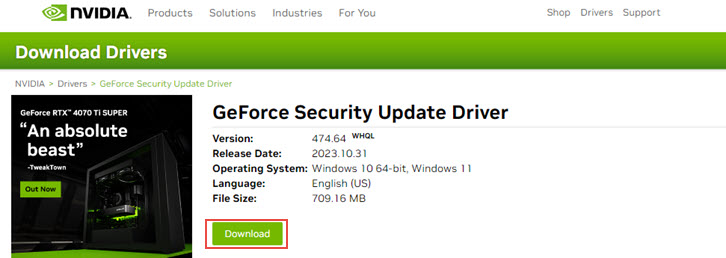
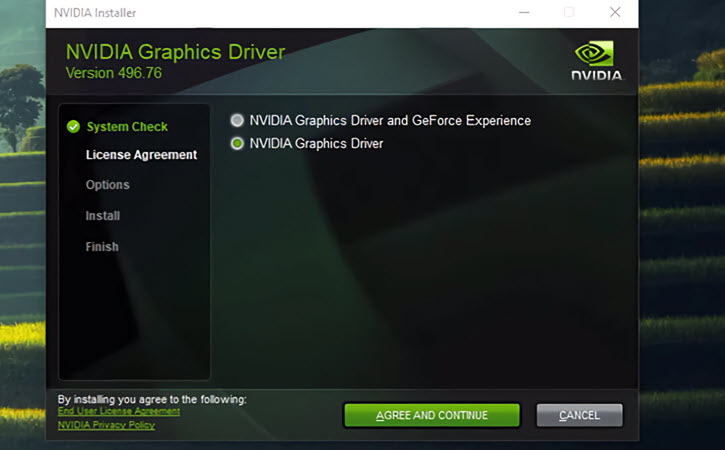
Step 3. Open the downloaded .exe file. Follow its instructions and keep the default settings to complete the installation. Restart your computer to let these changes take effect.
 Download and Install the Latest AMD Driver
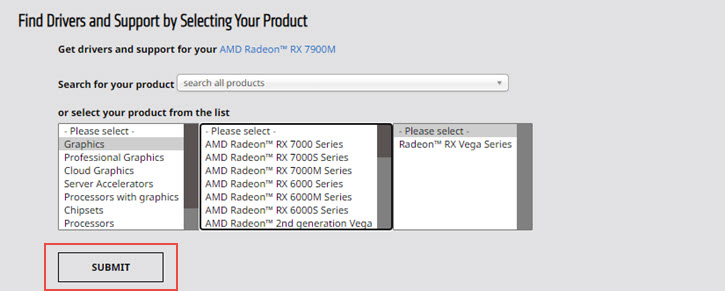
Step 1. Go to the official download page of AMD driver: https://www.amd.com/en/support. Select the type of your graphics card in the first column (graphics, processors with graphics, or others). Then select the series and specific product. Click Submit.
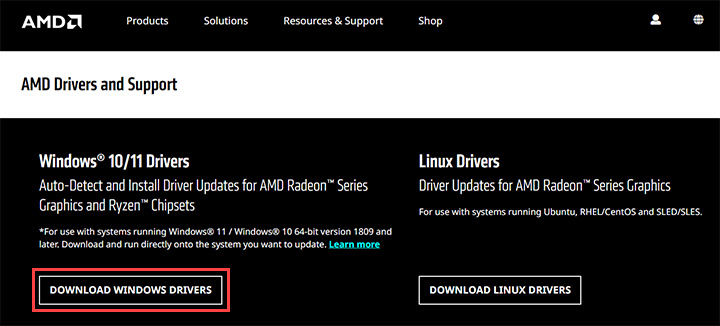
For Windows 11/10 64-bit version 1809 and later, you can click "DOWNLOAD WINDOWS DRIVERS" to install its auto-detect and install driver updates for AMD Radeon™ Series Graphics and Ryzen™ Chipsets.
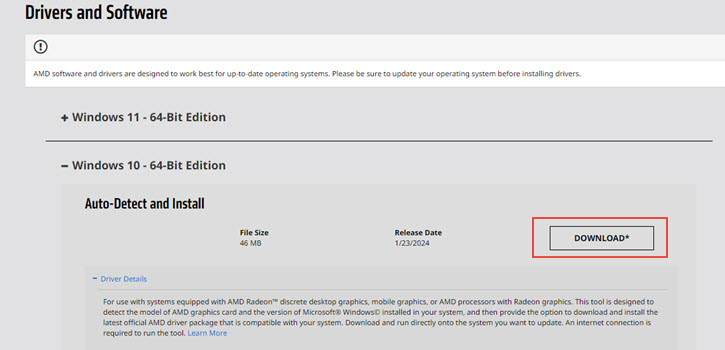
Step 2. Choose the edition according to your system version. Click the "Download" button.
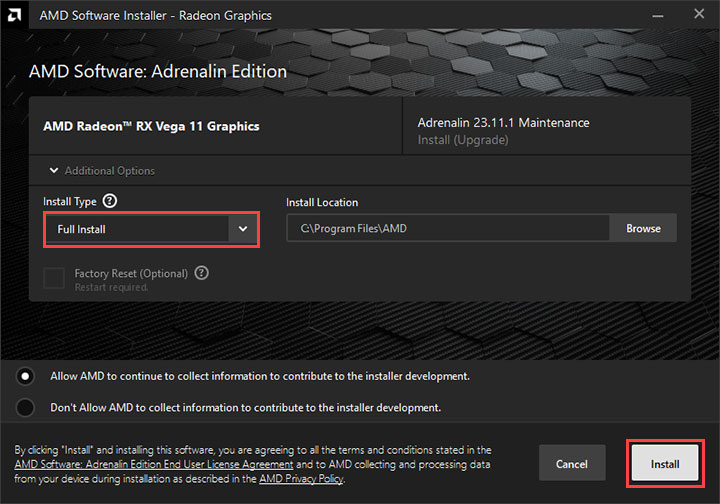
Step 3. When the driver installation package is saved, click the .exe file to launch the setup wizard. Restart your computer after the installation.
 Download and Install the Latest Intel Driver
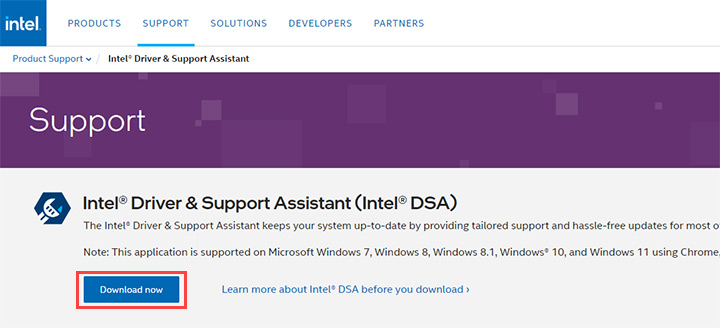
Step 1. Go to https://www.intel.com/content/www/us/en/support/detect.html, the official download page of Intel driver. Click "Download now".
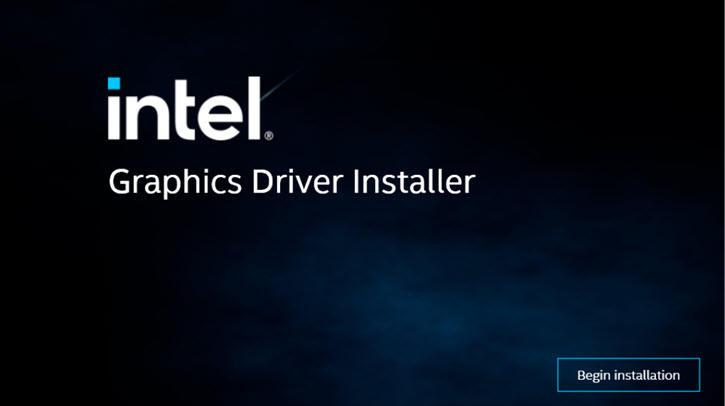
Step 2. When the download completes, double-click on the .exe file to open the installer. Click "Begin Installation".
Step 3. Keep default settings and follow its instructions. Finally, reboot your computer to run with the latest driver.
If you are still having issues, follow the steps below to send us the needed information for analysis.
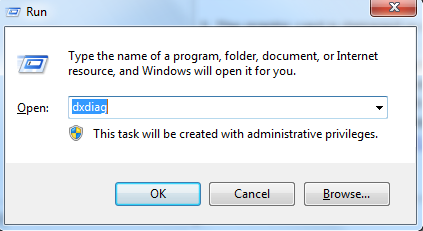
1. Click the Start menu > Run (Windows Logo + R) and enter "dxdiag". Click the OK button.
2. In the DirectX Diagnostic Tool window, click on the Display tab and take a screen shot to submit to us to analyze. To take a screen shot, you can press PRINTSCREEN on the keyboard and then click Start > All Programs > Accessories > Paint to access the paint program. Use CTRL+V to paste the screenshot and then save it. Once you have that saved, contact us and include the screenshot for us to find a solution.
Supported GPUs of EaseFab Software on Windows and Mac
Brand Name |
GPU Models |
| GeForce GTX 745 - 750 Ti, GeForce 845M / 940M / 940MX / 945M, GeForce GTX 850A > 960A, GeForce GTX 850M > 960M, GeForce GTX 750 / 950 - 960, GeForce GTX 965M, GeForce GTX 965M > 980M / 980MX, GeForce GTX 960 Ti - 980, GeForce GTX 980 Ti, GeForce GTX Titan X, GeForce GTX 1050 / 1050 Ti, GeForce GTX 1050 / 1050 Ti, GeForce GTX 1060, GeForce GTX 1060, GeForce GTX 1070M / 1080M, GeForce GTX 1070 / 1070Ti, GeForce GTX 1080, GeForce GTX 1080 Ti, GeForce GTX Titan X / Titan Xp, Titan V, GeForce GTX 1650 Max-Q, GeForce GTX 1650 GDDR5, GeForce GTX 1650 GDDR6, GeForce GTX 1650 GDDR6, GeForce GTX 1650 SUPER, GeForce GTX 1660 Ti Max-Q, GeForce GTX 1660 Ti / 1660, GeForce GTX 1660 SUPER, GeForce RTX 2060 / 2070, GeForce RTX 2060 SUPER, GeForce RTX 2060 (TU104), GeForce RTX 2070 Max-Q, GeForce RTX 2070 SUPER, GeForce RTX 2080, GeForce RTX 2080 Max-Q, GeForce RTX 2080 SUPER, GeForce RTX 2080 Ti, Titan RTX , GeForce RTX 3060, GeForce RTX 3060 Ti, GeForce RTX 3070, GeForce RTX 3080, GeForce RTX 3090. | |
| AMD Radeon™ RX 6900 XT, AMD Radeon™ RX 6800 XT Midnight Black, AMD Radeon™ RX 6800 XT, AMD Radeon™ RX 6800, AMD Radeon™ RX 6700 XT, AMD Radeon™ RX 6600 XT, AMD Radeon™ RX 6800M, AMD Radeon™ RX 5700 XT 50th Anniversary, AMD Radeon™ RX 6600, AMD Radeon™ RX 5700 XT, AMD Radeon™ RX 6700M, AMD Radeon™ VII, AMD Radeon™ RX 5700, AMD Radeon™ RX 5600 XT, AMD Radeon™ RX 5600, AMD Radeon™ RX 6600M, AMD Radeon™ RX 5700M, AMD Radeon™ RX 5500 XT, AMD Radeon™ RX 5600M, AMD Radeon™ RX 5500, Radeon™ RX Vega 64 Liquid Cooled, AMD Radeon™ RX 5500M, AMD Radeon™ RX 5300, AMD Radeon™ RX 5300M, Radeon™ RX Vega 64, Radeon™ RX Vega 56, Radeon™ RX 590, Radeon™ RX 590 GME, Radeon™ RX 580, Radeon™ RX 580 (OEM), Radeon™ RX 640, Radeon™ RX 580X, Radeon™ RX 580G, Radeon™ RX 580 2048SP, Radeon™ 630, Radeon™ RX 570, Radeon™ RX 570 (OEM), Radeon™ RX 570X, Radeon™ RX 570G, Radeon™ RX 560 XT, Radeon™ 625, Radeon™ RX 560, Radeon™ RX 560 (OEM), Radeon™ RX 560X, Radeon™ 620, Radeon™ RX 550, Radeon™ RX 550X, Radeon™ 610, Radeon™ RX 540, Radeon™ RX 540X, Radeon™ 550X, Radeon™ 540, Radeon™ 540X, Radeon™ 535, Radeon™ 530, Radeon™ 520, AMD Radeon™ RX 480, Radeon™ RX 470, Radeon™ RX 460, AMD Radeon™ R9 Fury X, AMD Radeon™ R9 Fury, AMD Radeon™ R9 Nano, AMD Radeon™ R9 390X, AMD Radeon™ R9 390, AMD Radeon™ R9 380X, AMD Radeon™ R9 380, AMD Radeon™ R9 M395X, AMD Radeon™ R9 M395, AMD Radeon™ R9 M390X, AMD Radeon™ R9 M390, AMD Radeon™ R9 M385X, AMD Radeon™ R9 M385, AMD Radeon™ R9 M380, AMD Radeon™ R9 M375X, AMD Radeon™ R9 M375, AMD Radeon™ R9 M365X, AMD Radeon™ R9 M360, AMD Radeon™ R9 295X2, AMD Radeon™ R9 290X, AMD Radeon™ R9 290, AMD Radeon™ R9 285, AMD Radeon™ R9 280X, AMD Radeon™ R9 280, AMD Radeon™ R9 270X, AMD Radeon™ R9 270, AMD Radeon™ R9 M295X, AMD Radeon™ R9 M290X, AMD Radeon™ R9 M285X, AMD Radeon™ R9 M280X, AMD Radeon™ R9 M280, AMD Radeon™ R9 M275X, AMD Radeon™ R9 M270X, AMD Radeon™ R9 M265X, AMD Radeon™ R7 370, AMD Radeon™ R7 360, AMD Radeon™ R7 M380, AMD Radeon™ R7 M375, AMD Radeon™ R7 M370, AMD Radeon™ R7 M365X, AMD Radeon™ R7 M365, AMD Radeon™ R7 M360, AMD Radeon™ R7 M350, AMD Radeon™ R7 M340, AMD Radeon™ R7 265, AMD Radeon™ R7 260X, AMD Radeon™ R7 260, AMD Radeon™ R7 250X, AMD Radeon™ R7 250, AMD Radeon™ R7 240, AMD Radeon™ R7 M270, AMD Radeon™ R7 M265X, AMD Radeon™ R7 M265AE, AMD Radeon™ R7 M265, AMD Radeon™ R7 M260X, AMD Radeon™ R7 M260, AMD Radeon™ R5 M335X, AMD Radeon™ R5 M335, AMD Radeon™ R5 M330, AMD Radeon™ R5 M320, AMD Radeon™ R5 M315, AMD Radeon™ R5 235, AMD Radeon™ R5 230, AMD Radeon™ R5 M255X, AMD Radeon™ R5 M255, AMD Radeon™ R5 M240X, AMD Radeon™ R5 M240, AMD Radeon™ R5 M230, AMD Radeon™ HD 8970M Series GPU, AMD Radeon™ HD 8870M Series GPU, AMD Radeon™ HD 8850M Series GPU, AMD Radeon™ HD 8830M Series GPU, AMD Radeon™ HD 8790M Series GPU, AMD Radeon™ HD 8770M Series GPU, AMD Radeon™ HD 8750M Series GPU, AMD Radeon™ HD 8730M Series GPU, AMD Radeon™ HD 8690M Series GPU, AMD Radeon™ HD 8670M Series GPU, AMD Radeon™ HD 8590M Series GPU, AMD Radeon™ HD 8570M Series GPU, AMD Radeon™ HD 7990, AMD Radeon™ HD 7970 GHz Edition, AMD Radeon™ HD 7970, AMD Radeon™ HD 7950, AMD Radeon™ HD 7870 GHz Edition, AMD Radeon™ HD 7850, AMD Radeon™ HD 7790, AMD Radeon™ HD 7770 GHz Edition, AMD Radeon™ HD 7750, AMD Radeon™ HD 7730, AMD Radeon™ HD 6970, AMD Radeon™ HD 6950, AMD Radeon™ HD 6870, AMD Radeon™ HD 6850, AMD Radeon™ HD 6770, AMD Radeon™ HD 6750, AMD Radeon™ HD 6670, AMD Radeon™ HD 6570, AMD Radeon™ HD 6450, ATI Radeon™ HD 5970, ATI Radeon™ HD 5870, ATI Radeon™ HD 5850, ATI Radeon™ HD 5830, ATI Radeon™ HD 5770, ATI Radeon™ HD 5750, ATI Radeon™ HD 5670, ATI Radeon™ HD 5570, ATI Radeon™ HD 5450. | |
| HD Graphics 2000, HD Graphics 3000, HD Graphics 2500, HD Graphics 4000, HD Graphics 4200, HD Graphics 4400, HD Graphics 4600, Iris Graphics 5100, Iris Pro Graphics 5200, HD Graphics 5300, HD Graphics 5500, HD Graphics 5600, HD Graphics 6000, Iris Graphics 6100, Iris Pro Graphics 6200, HD Graphics 510, HD Graphics 515, HD Graphics 520, HD Graphics 530, Iris Graphics 540, Iris Graphics 550, Iris Pro Graphics 580, HD Graphics 610, HD Graphics 615, HD Graphics 620, HD Graphics 630, Iris Plus Graphics 640, Iris Plus Graphics 650. | |
| MacBook (Early 2015 or newer) MacBook Pro (Mid 2012 or newer) MacBook Air (Mid 2012 or newer) Mac mini (Late 2012 or newer) iMac (Late 2012 or newer) Mac Pro (Late 2013) |



 Sales Team: